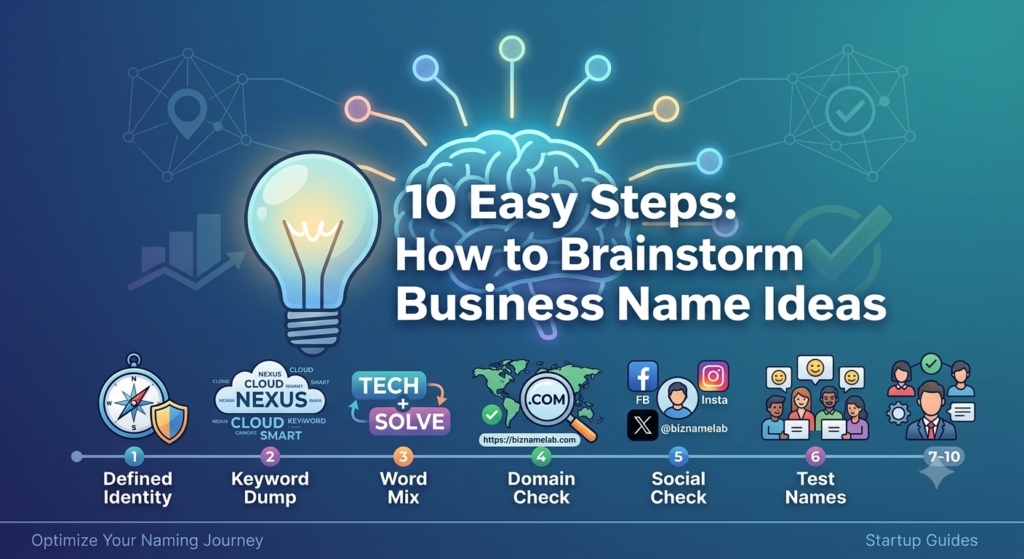
Catchy mobile app names are short, memorable, and pronounceable words or phrases that instantly convey your app’s purpose while standing out in a crowded App Store or Google Play listing. The strongest names combine a clear benefit, an emotional hook, and a name that’s easy to spell, search, and say out loud — usually under 25 characters.
Introduction
Picking one of the many catchy mobile app names floating around in your notebook is harder than it looks. Your app’s name impacts how your app is perceived before a single user opens it — it’s your first pitch, your first promise, and often your first impression in a search result. A strong name conveys your app’s purpose, sticks in memory, and gives you room to grow. This guide walks through the psychology, formulas, and legal steps behind naming an app that actually gets downloaded in 2026.
What Makes a Great App Name Work: The Psychology of Mobile Branding
A name isn’t just a label — it’s the first emotional signal a user gets about your product. Before anyone reads your app description or sees a screenshot, the name has already shaped their expectations. This is why how your name affects downloads matters more than most founders assume.
Psychologically, people gravitate toward names that are easy to pronounce, easy to recall, and tied to a feeling. Fluency — how effortlessly a brain processes a word — drives trust. That’s why short, phonetically smooth names like “Slack” or “Uber” outperform long, technical ones.
A great app name typically does three things at once:
- Signals a benefit — it hints at what the user gets, not just what the app does
- Creates an emotional hook — curiosity, confidence, calm, excitement
- Fits the category’s tone — playful for games, trustworthy for finance, clean for productivity
Why Emotional Resonance Beats Cleverness
Founders often chase the “smartest” pun in the room. But clever names that need explaining lose to simple names that feel right. Ask: does this name make a memorable impression on your users within three seconds of seeing it? If not, simplify it.
The Role of Sound and Rhythm
Short vowels, hard consonants, and two-syllable rhythms (Ka-Ma, Slack, Zoom) tend to stick better than four-syllable compound words. This is a subtle but real factor in unique app names that go viral organically.
Naming Patterns from the World’s Most Successful iOS and Android Apps
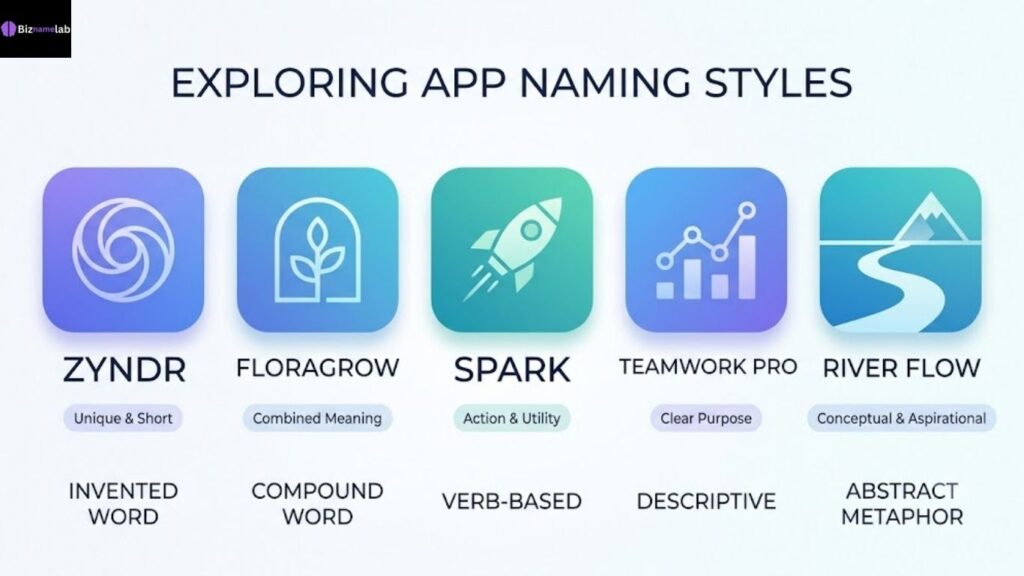
Studying top charts reveals repeatable naming patterns — not accidents. Most category leaders fall into one of five formulas.
| Pattern | Example Apps | Why It Works |
| Invented word | Spotify, Venmo, Slack | Fully brandable, trademarkable, no baggage |
| Compound word | Instagram, WhatsApp, Facebook | Combines two familiar ideas into one new meaning |
| Verb-as-name | Uber, Snap, Shazam | Turns the app into an action people say out loud |
| Descriptive + modifier | Google Maps, Adobe Scan | Clear function, easy for app store optimization |
| Abstract metaphor | Amazon, Apple, Nike (adjacent) | Evokes scale, nature, or emotion without literal meaning |
Lesson: Function Names Win Search, Invented Names Win Brand
Descriptive names help early discovery because they contain keywords related to your app’s functionality. Invented names win long-term brand equity because they’re ownable. Many 2026 apps now blend both — a distinctive root word plus a functional suffix (like “Notion” vs. “NotionAI”).
Productivity & Workspace App Name Ideas (With Modern Naming Formulas)
Productivity apps compete on clarity and calm. Users want a name that feels organized before they’ve even opened the app.
App name ideas for productivity tools:
- FlowDesk
- TaskNest
- ClearDay
- SprintBoard
- ZenQueue
- NoteHive
- PlanLoop
- FocusPilot
Creative Naming Formulas for Productivity Apps
Use these app name formula patterns as templates:
- Verb + Noun: Plan + Loop = PlanLoop
- Adjective + Object: Clear + Day = ClearDay
- Nature metaphor + Function: Hive + Note = NoteHive
- Compressed phrase: “Get It Done” → GetDun
These creative app naming formulas work because they compress a benefit into a single visual word, which helps both branding and app store optimization.
Health & Fitness App Name Ideas That Inspire User Action
Fitness and wellness names need momentum — words that make someone want to move, breathe, or commit.
Health & fitness app name ideas:
- PulseTrack
- FitArc
- CalmBreath
- StrideWell
- IronPace
- GlowMeals
- RestCycle
- CoreShift
Naming for Motivation vs. Naming for Calm
Split your naming direction based on your target audience and the problems it solves. High-intensity training apps benefit from punchy, energetic names (IronPace, StrideWell). Mental wellness or sleep apps do better with soft, slow-sounding names (CalmBreath, RestCycle).
Always test the potential names with your target audience before finalizing — a name that feels “energetic” to you might feel aggressive to a beginner user.
Finance & Fintech App Name Ideas for Trust and Security
Money apps carry the heaviest trust burden of any category. A single awkward or juvenile-sounding name can quietly kill conversions.
Fintech app name ideas for trust:
- VaultWise
- ClearLedger
- TrustBank Go
- PennyArc
- SafeYield
- LedgerLoop
- CoinGuard
- BudgetHarbor
What Makes Fintech Names Feel Secure
Words like “vault,” “ledger,” “guard,” “safe,” and “trust” work as semantic anchors — they don’t need explaining, and they immediately reassure a cautious user. Avoid slang or overly playful wordplay here; fintech is one category where unique selling points should sound serious, not gimmicky.
Gaming & Entertainment App Name Ideas to Stand Out in the App Store
Games and entertainment apps can be the loudest, weirdest, and most playful category — and that’s exactly the point.
Gaming and entertainment app name ideas:
- PixelDrift
- QuestForge
- NeonRumble
- LoopArcade
- ClashNest
- MythSprint
- GlowRunner
- BeatBounce
Standing Out Among Millions of Titles
With millions of games in the store, unique app names need a visual or sonic hook — something a streamer can say on camera in half a second. Alliteration (BeatBounce, ClashNest) and invented compound words (NeonRumble) both perform well for recall and shareability.
Education, Learning, & AI Tech App Name Ideas for 2026
AI-driven learning tools are one of the fastest-growing app categories heading into 2026, and naming trends are shifting away from generic “Edu” prefixes toward smarter, more human-sounding brands.
Education, learning & AI app name ideas:
- LearnLoop AI
- MindForge
- ClassPilot
- QuizNest
- SkillArc
- TutorPulse
- BrightPath AI
- StudySprint
Naming AI Features Without Overusing “AI”
Tacking “AI” onto every name is quickly becoming an app naming mistake in itself — it reads as generic by 2026. Instead, imply intelligence through words like “Pilot,” “Forge,” or “Pulse,” which suggest guidance and adaptiveness without needing the literal label.
App Store Optimization (ASO): How Your App Name Affects Downloads
Your app’s name is one of the top three ranking signals inside both the App Store optimization algorithms — alongside your subtitle and keyword field. This is where naming stops being art and starts being strategy.
Why the Name Field Carries So Much Weight
The app name field is indexed more heavily than almost any other metadata field. A name that includes a relevant, searchable term (without stuffing) can meaningfully boost visibility for that term. This is exactly how your name affects downloads — more impressions lead to more organic installs, before you spend a cent on ads.
Practical ASO Naming Checklist
- Include one relevant keyword if it fits naturally (e.g., “Budget” in a finance app name)
- Avoid repeating the same keyword in both the name and subtitle
- Keep the brand root consistent across app icon, splash screen, and marketing
- Check how the name truncates on a home screen icon (test at actual mobile size)
Formatting Rules: Character Limits and Guidelines for Google Play and Apple App Store
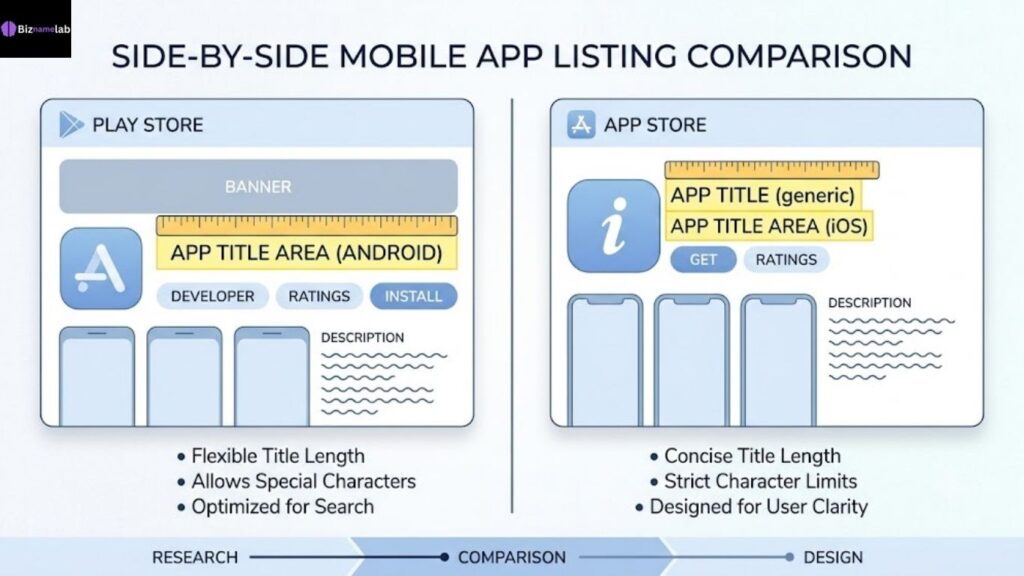
Before you fall in love with a name, check it against the platforms’ technical limits — this single step saves painful last-minute rebrands.
| Platform | Field | Character Limit |
| Apple App Store | App Name | 30 characters |
| Apple App Store | Subtitle | 30 characters |
| Google Play | App Title | 30 characters |
| Google Play | Short Description | 80 characters |
| Both | Home Screen Display | ~11–13 characters before truncation |
Key Formatting Guidelines
- Stick to character limits for Google Play and Apple exactly — both platforms will reject or auto-truncate longer titles
- Avoid special characters, emojis, or excessive capitalization, which can trigger manual review delays
- Keep your core brand word within the first 11–13 characters so it isn’t cut off on the home screen icon label
- Match capitalization style across both platforms for brand consistency
Trademark Checks and App Domain Name Registration: Securing Your Brand
A name only becomes an asset once it’s legally yours. Skipping this step is one of the costliest mistakes founders make.
Step-by-Step: Securing Your App Name
- Search the trademark database. Use the USPTO trademark search tool to check and confirm availability in your business category before you commit.
- Verify social handle availability. Consistent handles across platforms protect brand recognition.
- Register your website domain name and, separately, your app domain name registration for marketing pages and support documentation.
- Check app store name collisions — search both Apple and Google Play directly for exact and close matches.
- File your trademark application once the name clears trademark and domain availability checks.
If you’re still brainstorming, tools like a business name generator paired with a dedicated naming resource such as BizNameLab can help you generate and pressure-test business name ideas before you invest in legal filings. For guidance on pairing your name with the right visual identity, see this resource on tech brand color palettes.
Common App Naming Mistakes That Can Tank Your Downloads
Even great products lose users at the naming stage. Watch for these recurring mistakes.
- Overly generic names — “Fitness Tracker Pro” tells nothing about personality or differentiation
- Hard-to-spell invented words — if users can’t spell it, they can’t search for it
- Ignoring localization — a name that works in English may carry unintended meaning elsewhere
- Skipping user testing — always test the potential names with your target audience before launch, not after
- Copying competitor structure too closely — near-identical names invite legal risk and user confusion
- Forgetting mobile-first checks — a name might look great on a laptop screen and still get clipped on a phone icon
- No domain or trademark check — building a brand around a name you can’t legally keep
Real-World Example
A wellness app once launched as “Breeze” only to discover a nearly identical competitor already dominated that exact term in search results. A rename mid-growth cost them months of rebuilt SEO and lost app store reviews tied to the old name — a preventable loss with an earlier trademark and domain check.
Conclusion: Ready to Name Your App? Aligning Your Title with Your Core Identity
The best app names aren’t chosen by accident — they’re built from a clear understanding of your target audience and the problems it solves, backed by a name that’s legally clear, technically compliant, and emotionally resonant. Whether you’re launching a productivity tool or the next big fintech app, treat naming as a strategic decision, not a creative afterthought. Get the formula right, verify it legally, and your app name will keep working for you long after launch day.
Key Takeaways
- A strong app name conveys your app’s purpose and creates a fast emotional connection with users
- Naming formulas — compound words, verb-based names, invented brandable words — are repeatable and testable
- App store optimization rewards names with one clear, relevant keyword, not keyword stuffing
- Stay within official character limits for Google Play and Apple to avoid truncation or rejection
- Always check and confirm availability through USPTO trademark search and domain registration before launch
- Test the potential names with your target audience before finalizing your brand
FAQs
Q: What makes an app name “catchy”?
A catchy app name is short, easy to pronounce, emotionally resonant, and clearly tied to the app’s core benefit — usually memorable within seconds of hearing it once.
Q: How long can an app name be on Google Play and the Apple App Store?
Both platforms currently allow up to 30 characters for the main app title, though names under 13 characters display best on home screen icons.
Q: Should my app name include a keyword?
Including one relevant keyword can help discovery, but stuffing multiple keywords into the name looks unprofessional and can hurt both branding and app store review approval.
Q: How do I check if an app name is trademarked?
Search the official USPTO trademark database and separately check exact-match names already live on Google Play and the Apple App Store before committing.
Q: Can I change my app name after launch?
Yes, but renaming resets some app store search history and reviews tied to the old title, so it’s best treated as a last resort rather than a routine option.
Q: What’s the difference between a domain name and an app domain name registration?
A general website domain name covers your marketing site, while app domain name registration often refers to securing matching domains (like .app or .io) specifically for your product’s digital presence.